
Roulette Strategy Simulator
Have a roulette system you want to evaluate over time? The Roulette Strategy Simulator offers a hands-on way to explore it. Evan Carrington's Al Buraq Regina tool lets you run a betting idea through hundreds or even thousands of virtual spins and watch how your bankroll changes, without spending a cent. Before trying a plan at a live table with real money, use the simulator to test its rules and decide whether it merits further consideration.
Roulette Strategy Simulator
Place at least one bet on the table before running the simulation.
Test Summary ?
Balance Trend ?
Balance trend data will appear here after a test.
Result Per Spin ?
| Spin | Number | Status | Bet | Payout | Balance |
|---|
Spin results will appear here after a test.
Simulation History ?
| Test | P/L | ROI | Balance |
|---|
Your simulation history will appear here.
Set Up the Simulator
A test takes about thirty seconds to set up. Pick a roulette version, enter the number of spins to simulate, choose a starting bankroll, and select a betting system. Once you have entered these settings, the simulator runs the test and shows the outcome.
Select a Roulette Version

The simulator offers three roulette versions commonly seen in online and land-based casino settings. The wheel layouts differ, which means each version has a different mathematical house edge.
- European Roulette: Often the preferred choice for better odds among these versions, European Roulette has a single-zero wheel, giving it the lowest house advantage of the three.
- American Roulette: This familiar version has a double zero. The extra green pocket increases the house edge, lowering the player's chances of winning compared with European Roulette.
- Triple Zero Roulette: This wheel layout adds a third zero pocket. That extra pocket significantly raises the house advantage, making Triple Zero the hardest of these three versions in which to end ahead.
Choose the Number of Roulette Spins
Choose how long the test will run. You can simulate anywhere from 10 to 1,000 spins.
A higher spin count gives a broader view of a strategy's performance over time, including winning streaks and losing runs. A shorter test can offer a quick first look at a new idea.
Try a short test for an initial impression. If the outcome interests you, raise the spin count to see how the system fares over a longer run.
Starting Balance
This is the virtual bankroll for the simulation. Choose a starting balance from 50 EUR to 100,000 EUR.
Strategies that increase stakes after losses, such as the Martingale, require more starting balance. A larger virtual bankroll may withstand a losing streak for longer before the test stops.
The simulation stops automatically if your balance reaches zero or falls below the amount needed for the next stake required by your selected system.
Betting Strategy Rules
Choose how the simulator will place bets. After each spin, it automatically adjusts the next wager according to the system you selected.
- Default (Flat Betting): This simple approach keeps the stake the same on every spin.
- Double after a loss (Martingale): After a loss, the next bet doubles.
- Double after a win (Reverse Martingale / Paroli): This progression turns the usual pattern around, doubling the stake after a win to try to extend a winning streak.
- +X on loss, -X on win (D'Alembert): This gentler progression adds one unit to the bet after a loss and removes one unit after a win.
- +X on win, -X on loss (Reverse D'Alembert): This flips the D'Alembert pattern: add one unit after a win and take one away after a loss.
Since each system reacts differently to wins and losses, the same sequence of spins can create very different bankroll patterns as the test runs.
Place Bets and Run the Simulation
Placing bets and starting a test is simple. The table uses a familiar online casino layout, so you can choose betting positions without learning a new design.
Select a Chip
First, choose a chip denomination. You can use as little as 0.10 EUR for a cautious test or as much as 500 EUR to model a higher-stakes session.
Interactive Roulette Table
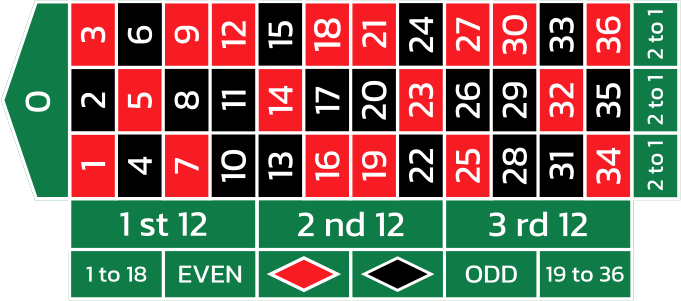
The interactive table shows all available inside and outside bets. Switching to American or Triple Zero roulette updates the layout to include the extra pockets. Click the relevant position to place a wager, then add chips as you would in an online roulette game.
Run the Simulation
Once your bets are set, click the large green "TEST" button. The simulator spins the wheel and applies your selected betting rules from one spin to the next. The results reflect the settings you entered for the test.
Review Your Simulation Results
After the run finishes, examine the figures to see how your chosen strategy performed. The results summarize key measures of how the system behaved during the simulated session.
Test Summary
The summary gathers the main test figures once the final spin is complete.
- Profit/Loss
- ROI (Return on Investment)
- Win/Loss Rate
- Streaks (best and worst)
- Average Payout
- Max/Min Balance
These figures offer a quick snapshot of the system's performance and may help you decide whether to keep its rules, modify them, or try a different approach.
Balance Trend Graph
The line graph tracks the bankroll from the first spin to the last. It gives you a visual way to spot winning runs and steep drops. Simulating more spins provides a more complete picture of how your balance changed during the session.
Results for Each Spin
For a closer look, the tool logs every spin. Check the stake, winnings, and balance after each one to see when a strategy started losing money or the session's direction changed.
Your Tests
Each simulation is saved automatically, so you can revisit earlier results and compare systems using measures such as profit, ROI, or ending balance.
You can reopen past tests to review their detailed statistics and graphs. This can help you refine the rules and consider an approach that suits your intended playing style, without treating a single result as a forecast.
Reasons to Use a Roulette Strategy Simulator
Taking an untested strategy to a casino table can put you at risk of avoidable losses. A simulator offers a virtual setting to explore betting systems without wagering real money, helping you spot potential weaknesses before considering a live game.
You can also compare strategies under the same simulated conditions and see how they fare through different sequences of results. Treat it as a way to practice and examine ideas, not as a forecast of what comes next.
Al Buraq Regina notes that no tool can promise profits or guarantee that you will beat the house. A simulation can reveal patterns and inform your choices, but chance and the house edge remain, and virtual outcomes cannot predict future results.
Random Card Generator
Suits to include
Card values to include
Select the DRAW CARDS button to deal your cards.